
Buyer Tool

Wire Mesh RFQ Specification Builder

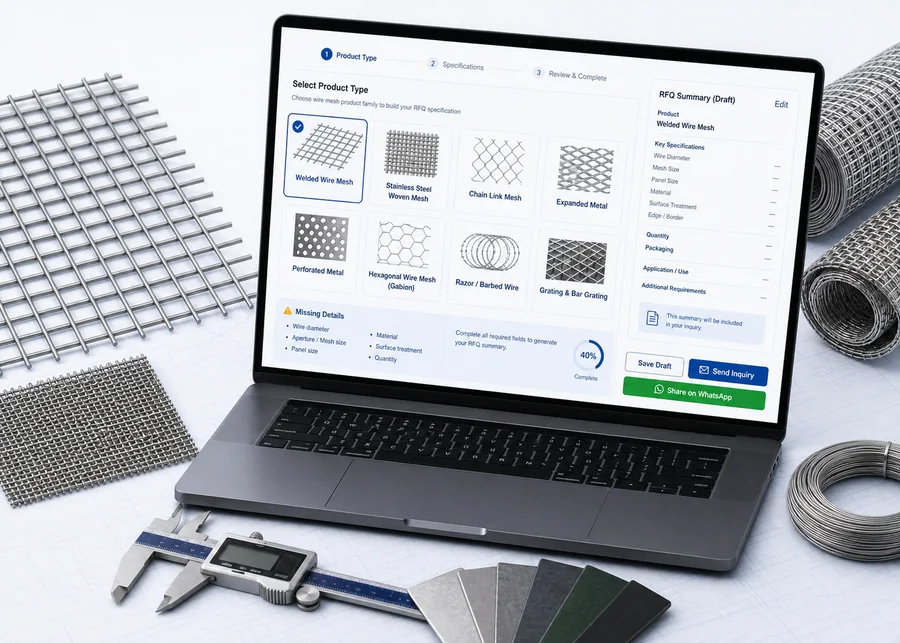
Select a product type, fill the specifications you know, and generate an inquiry-ready RFQ summary for importers, distributors and project procurement teams contacting ANJIA.

Digital wire mesh RFQ specification builder interface with summary output
Use known specifications or partial details, then send an RFQ summary for supplier confirmation.
RFQ Builder

Build a cleaner wire mesh RFQ

Choose the product family, fill the details you know, and keep missing details visible for supplier confirmation by importers, distributors and project procurement teams.

1. Product Family

The selected family controls the specification fields and related product links.

2. Basic RFQ Context

These fields help ANJIA route the inquiry. They are not sent to analytics as raw text.

Wire Mesh / Welded Mesh Specifications

Fields change by product family. Unknown values can stay as To be confirmed.

3. Material, Finish & Packing

How to use this RFQ builder

Select the closest product family first. The form then shows the fields importers, distributors and project procurement teams usually need for a first quotation discussion.

  • Use calculators when you need weight, open area, post quantity or roll coverage estimates.
  • Use this builder when the priority is a clean first inquiry summary.
  • Read the wire mesh RFQ specification guide when you need to understand which fields affect quotation review.
  • For galvanized or PVC coated fence requirements, read the coating specification guide or download the coating reference pack before finalizing RFQ wording.
  • Attach drawings or photos on the inquiry page when they are available.

RFQ scope note

This builder does not calculate price and does not confirm engineering design. ANJIA should confirm final specification, feasibility, packing and documents before quotation or production.

FAQ

RFQ specification builder questions

How is this different from the RFQ checklist?

The checklist is a reference page. This builder creates a product-family-specific RFQ summary that can be copied, sent through the inquiry page or shared for supplier confirmation.

Do I need to fill every field before sending an RFQ?

No. Unknown values can stay as To be confirmed. The missing details list helps ANJIA identify what should be confirmed before quotation.

Does this builder calculate price or engineering results?

No. It only prepares sourcing information for RFQ discussion. Final specifications, production feasibility, packing and documents should be confirmed by ANJIA.

Can I use this for photos or uncertain product names?

Yes. Choose Other / Not Sure, describe the product and attach photos or drawings on the inquiry page when available.

Scroll to Top